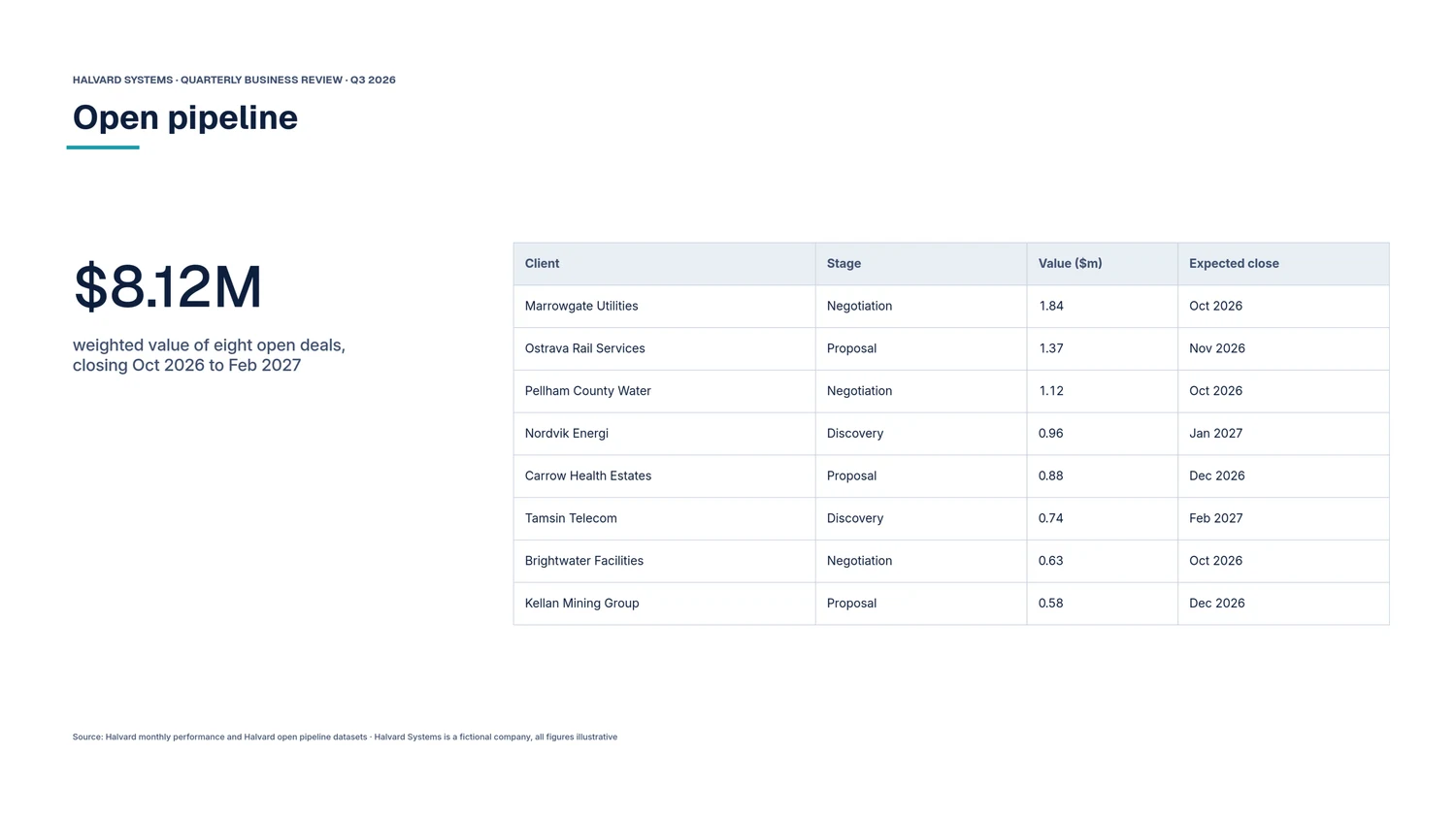
For teams that send the same report every week, month or quarter.
Reports built on your data, not on a guess
Ask your data a question, design the answer to your standard, and let Rahoto send it on the schedule you set, checked against the numbers every time.
Free for individuals. Paid plans from $69 per workspace a month. No card to start.
In the Rahoto editor
Sources, layout, schedule, delivery and audit trail are all part of the document, so the report you send in March is the one you approved in January, with March’s numbers in it. See how AI composes a first draft
Analysis
Answers from your data, with the working shown
Pick a dataset, ask in plain words, and get a chart, a one-line finding and how fresh the data is. When a question can’t be answered honestly, Rahoto says why.
- Ask
- Ask in plain words. Rahoto works out the answer from your rows and shows the chart, the finding and how fresh the data is.
- Trust
- If a draft names a field your data doesn’t have, Rahoto fixes it or drops it before you see it. Before each scheduled issue it checks the text against the data, and the same data rules hold in the report you send.
- Keep
- Turn on “keep up to date” and Rahoto reruns the answer when the data refreshes and tells you if it changed. It never approves anything for you.
Why not a chat window
A chat window is a good place to think. It is the wrong place to keep a report: it only knows what you paste, it can’t see who is allowed to read what, and next month you start again. BI is where analysis lives, and Rahoto publishes on top of it. Slides look right once and need rebuilding every cycle.
| Question | General AI chat | BI dashboards | Slides and spreadsheets | Rahoto |
|---|---|---|---|---|
| Knows which numbers are governed and who may see them | No: it sees what you paste | Yes, on screen | No | Yes, and the same rules hold in the delivered report |
| Checks its words against the data | No | No narrative | Manual | Yes, before an issue goes out |
| Looks like your work | No | Looks like the tool | Yes, by hand every month | Yes, built once |
| Runs again on the 1st without you | No | Waits to be opened | No | Yes, and delivers it |
Why a chat window can’t keep your report See how Analysis works
The editor
A design canvas made for reports
The Rahoto editor building the Halvard Systems quarterly review, one action at a time.
-
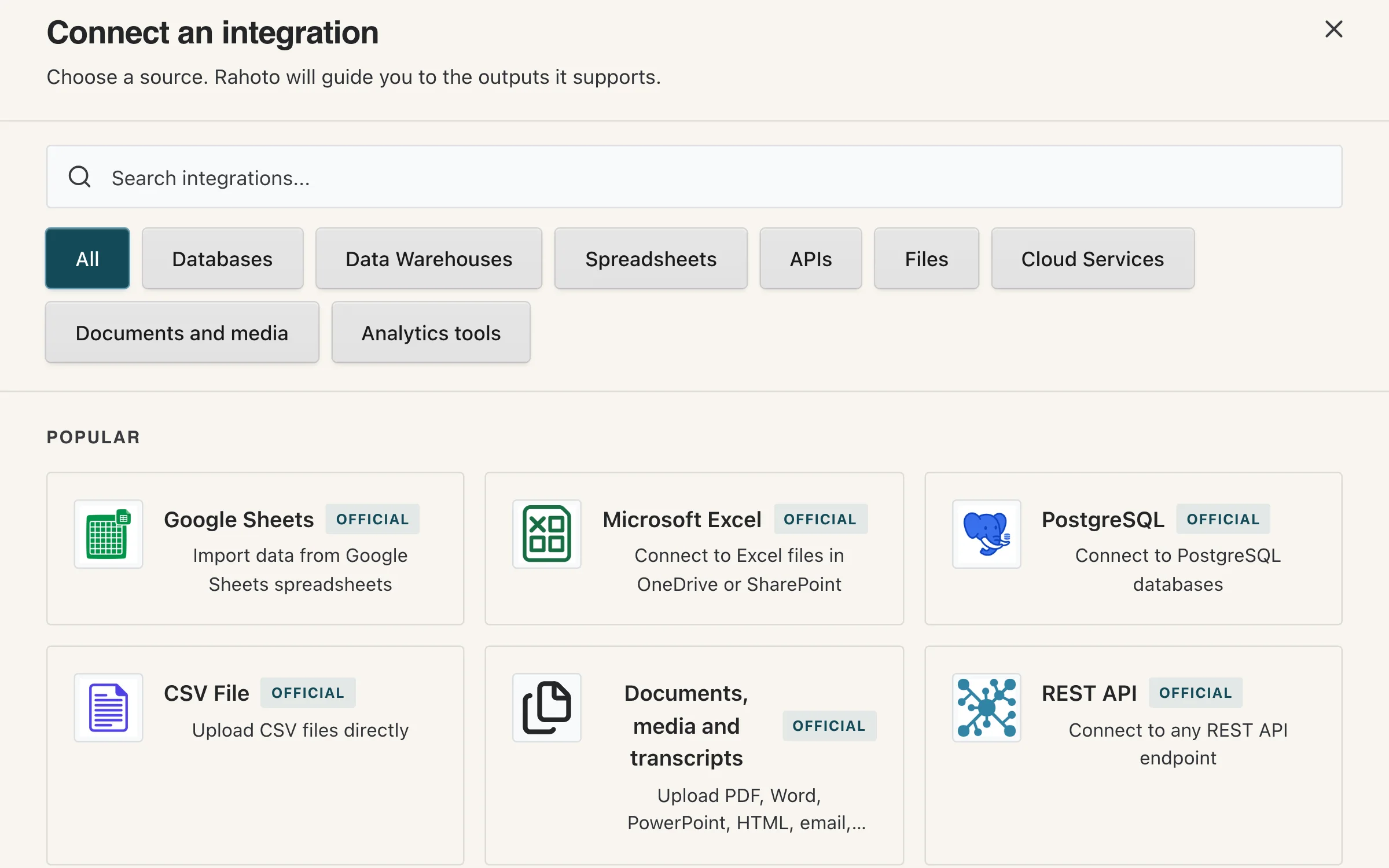
Connect a source
Pick a source from the connector catalogue: databases, warehouses, spreadsheets, APIs, files and documents. Halvard’s monthly figures arrive as a CSV upload.
-
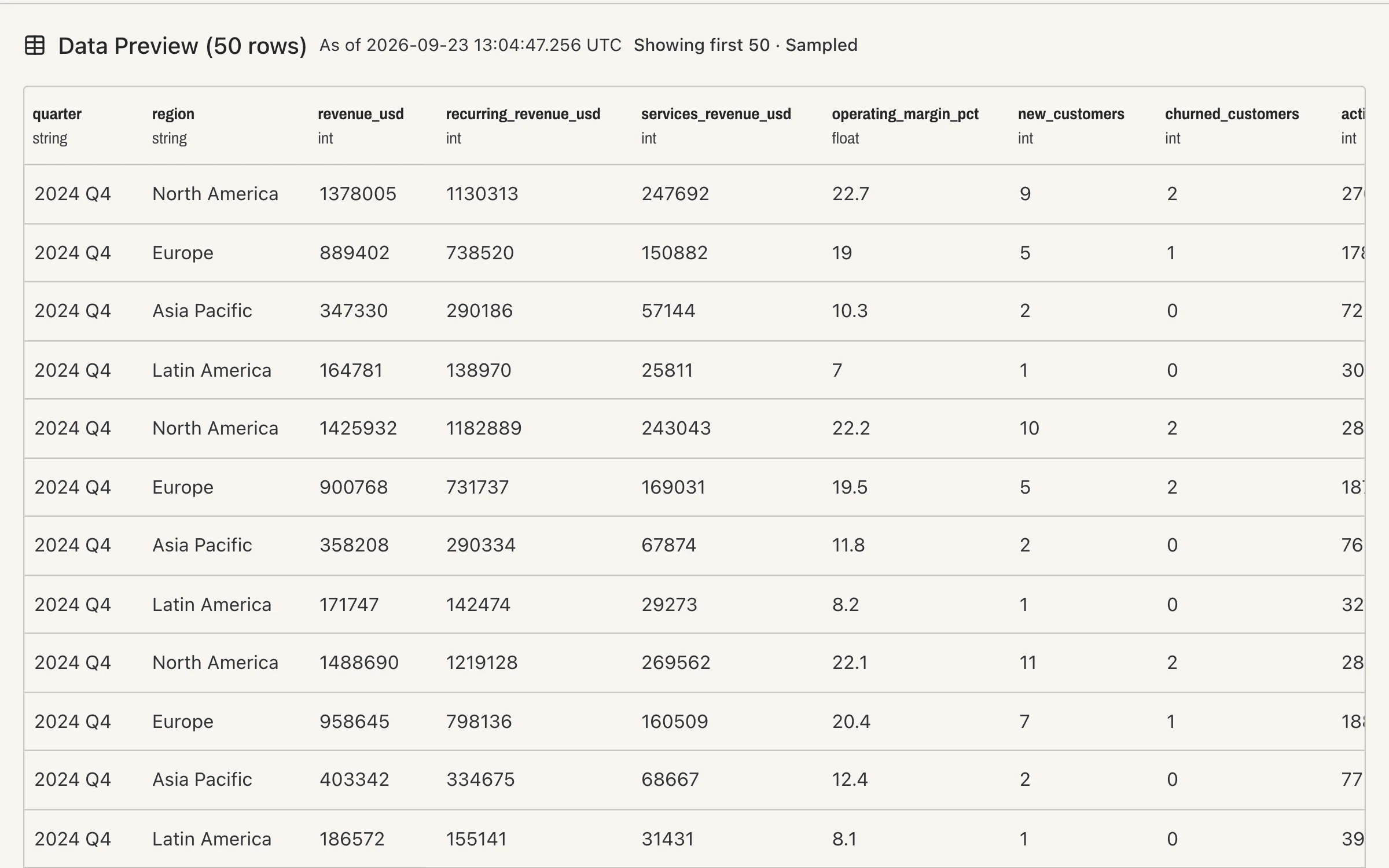
See the data
The dataset opens as a typed preview before it touches the report: quarter and region as text, revenue as whole numbers, stamped with the time of the snapshot.
-
Bind a chart
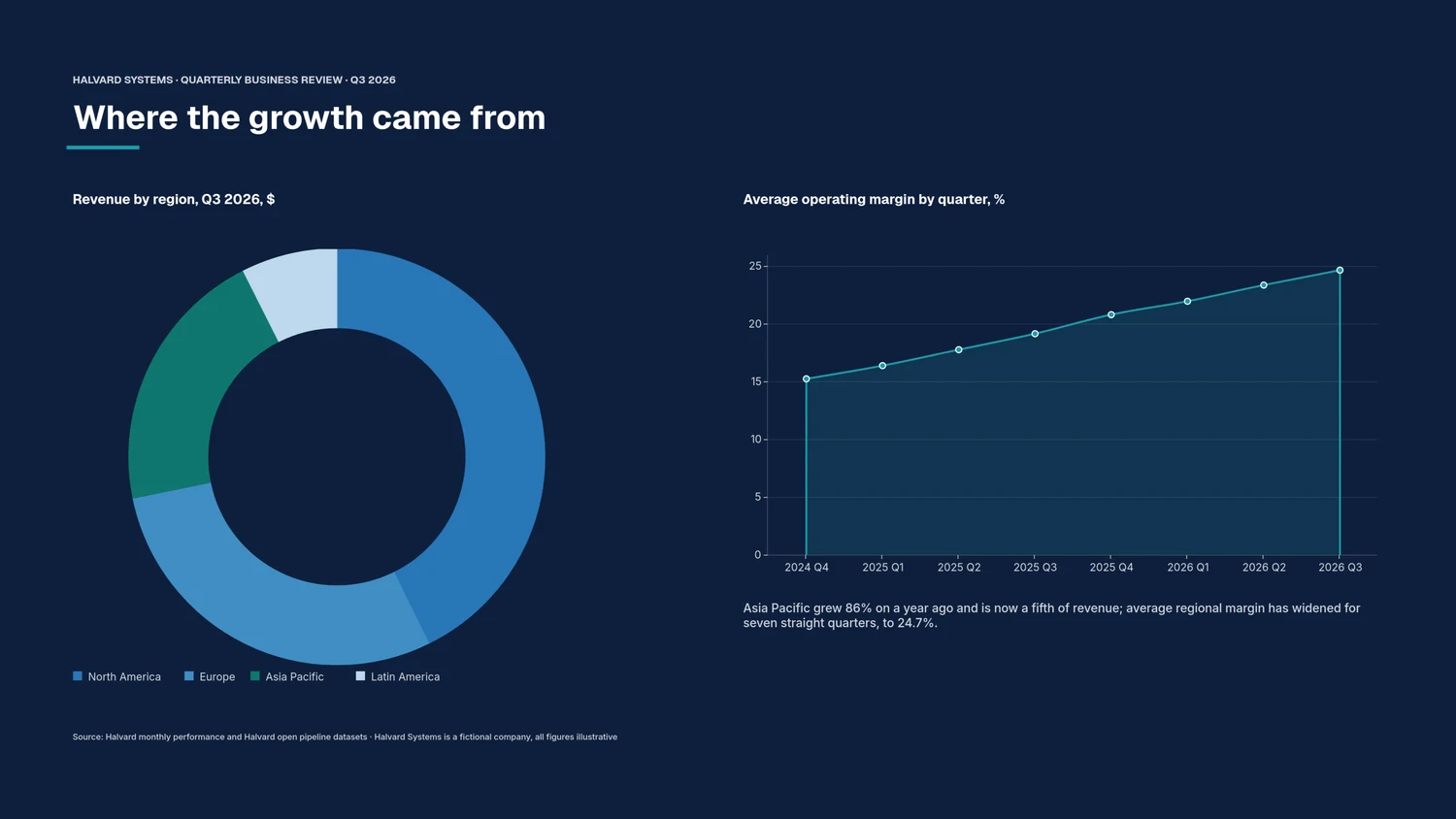
Map the dataset’s columns to the chart: region to category, revenue summed to value. The bars are drawn from the rows in the report’s own colours, so the chart changes when the data does.
Binding a bar chart to a dataset, in the report’s own colours. Recorded in the Rahoto editor. 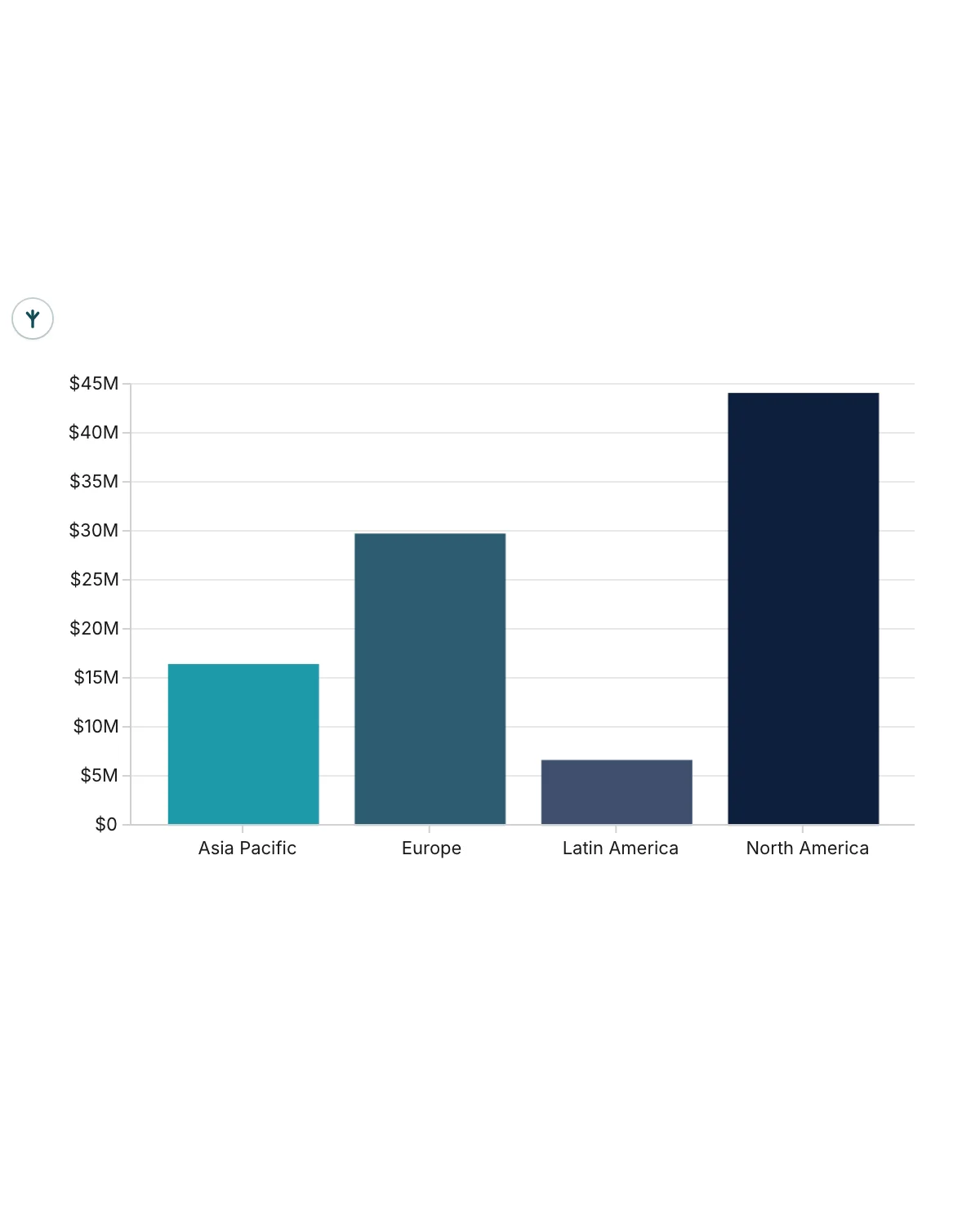
-
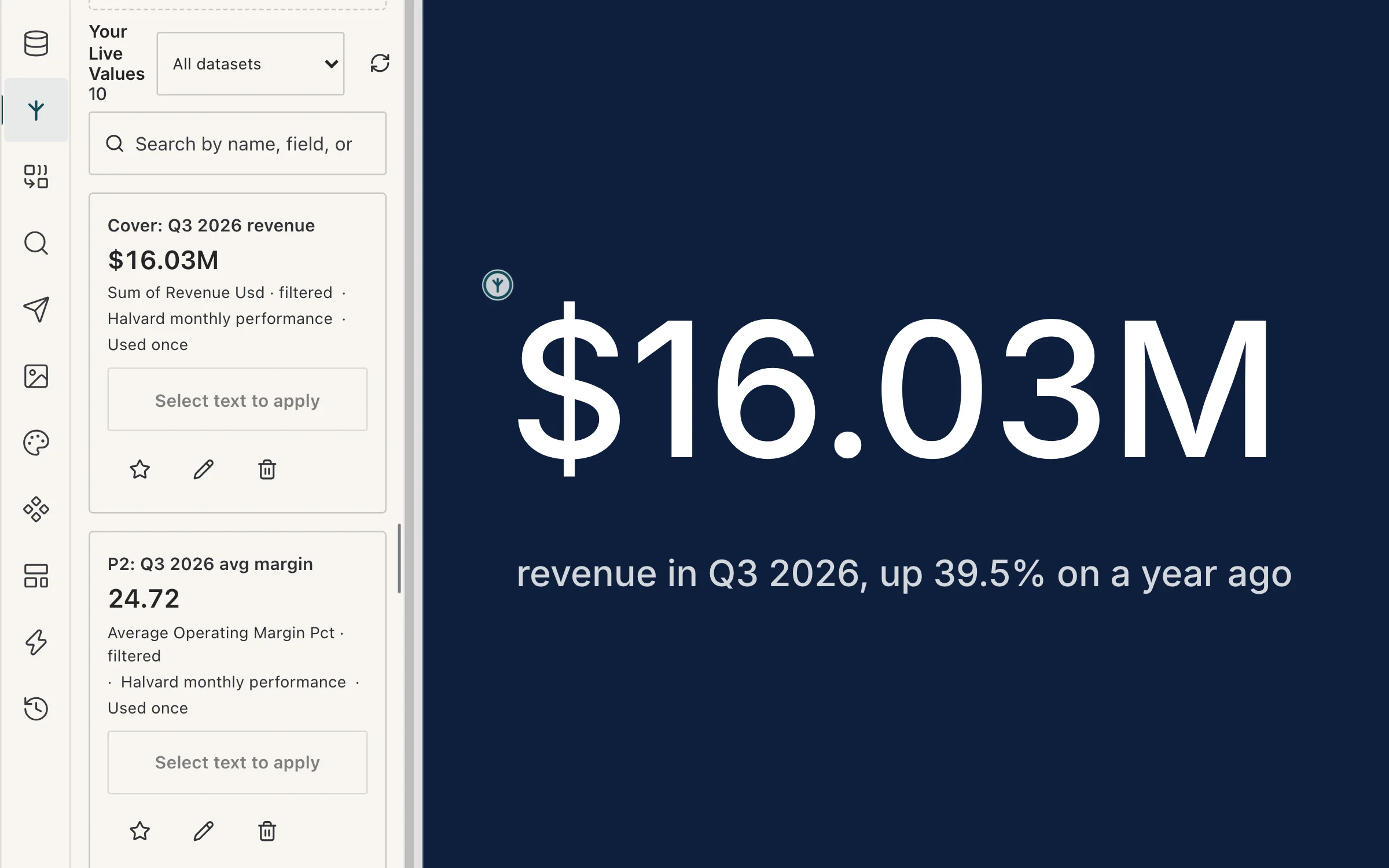
Make a figure live
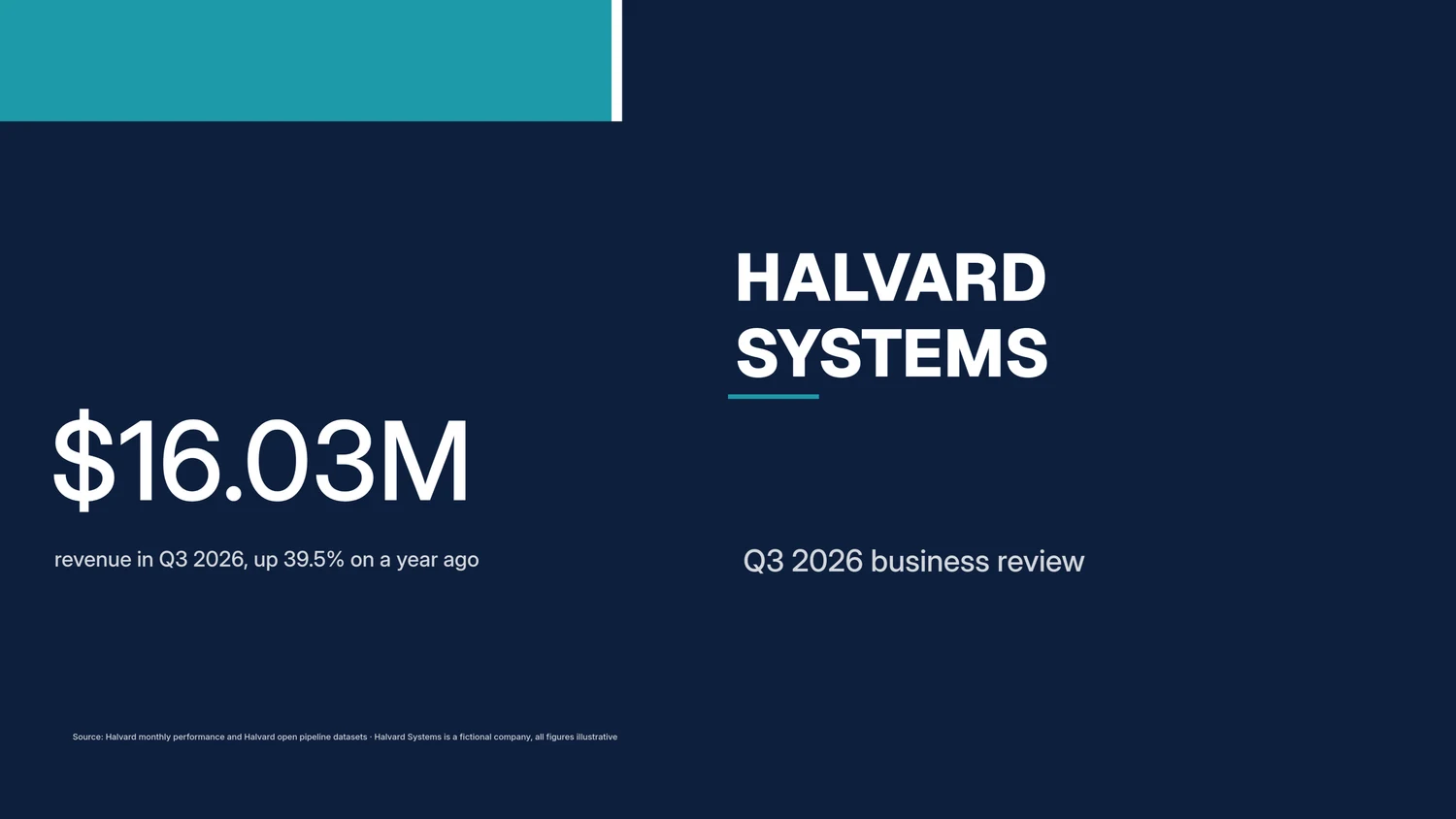
Bind a figure on the page to a Live Value. The cover’s $16.03M is the quarter’s revenue, summed from the dataset, and it updates whenever the data refreshes.
-
Make it yours
A brand kit applies your fonts, colours and logo in one step. Then any part of a chart can be restyled, one element at a time.
Made to your standard
- Brand kit
- Your fonts, colours and logo, applied in one step.
- Chart elements
- Select and restyle any bar, label, axis or legend.
- Typesetting
- Real typesetting: shaped text, kerning and proper line breaking.
101 chart templates. Explore 200,000 points on the GPU; design up to about 1,000 editable marks.
Anatomy of a page
What makes a page runnable
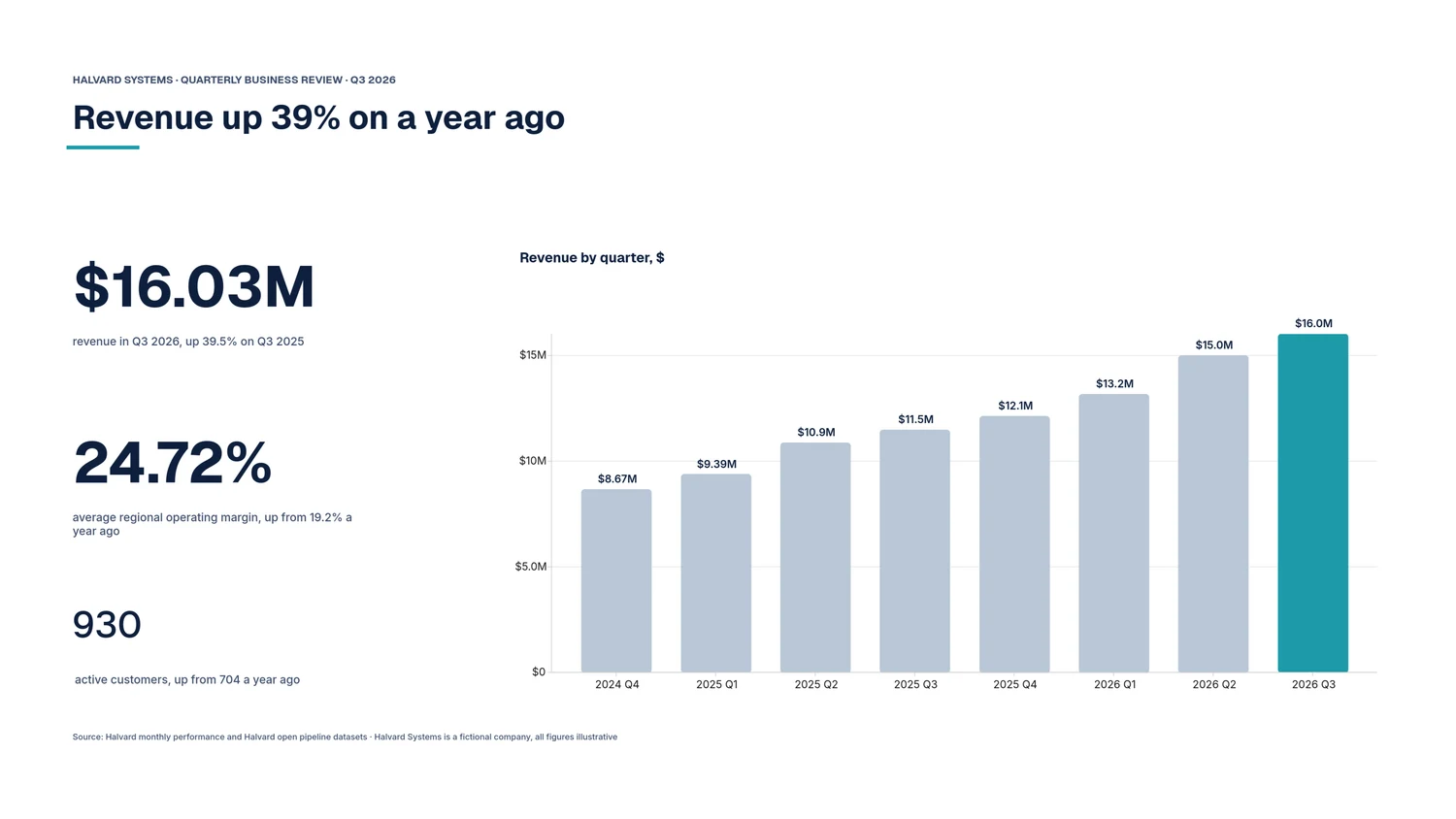
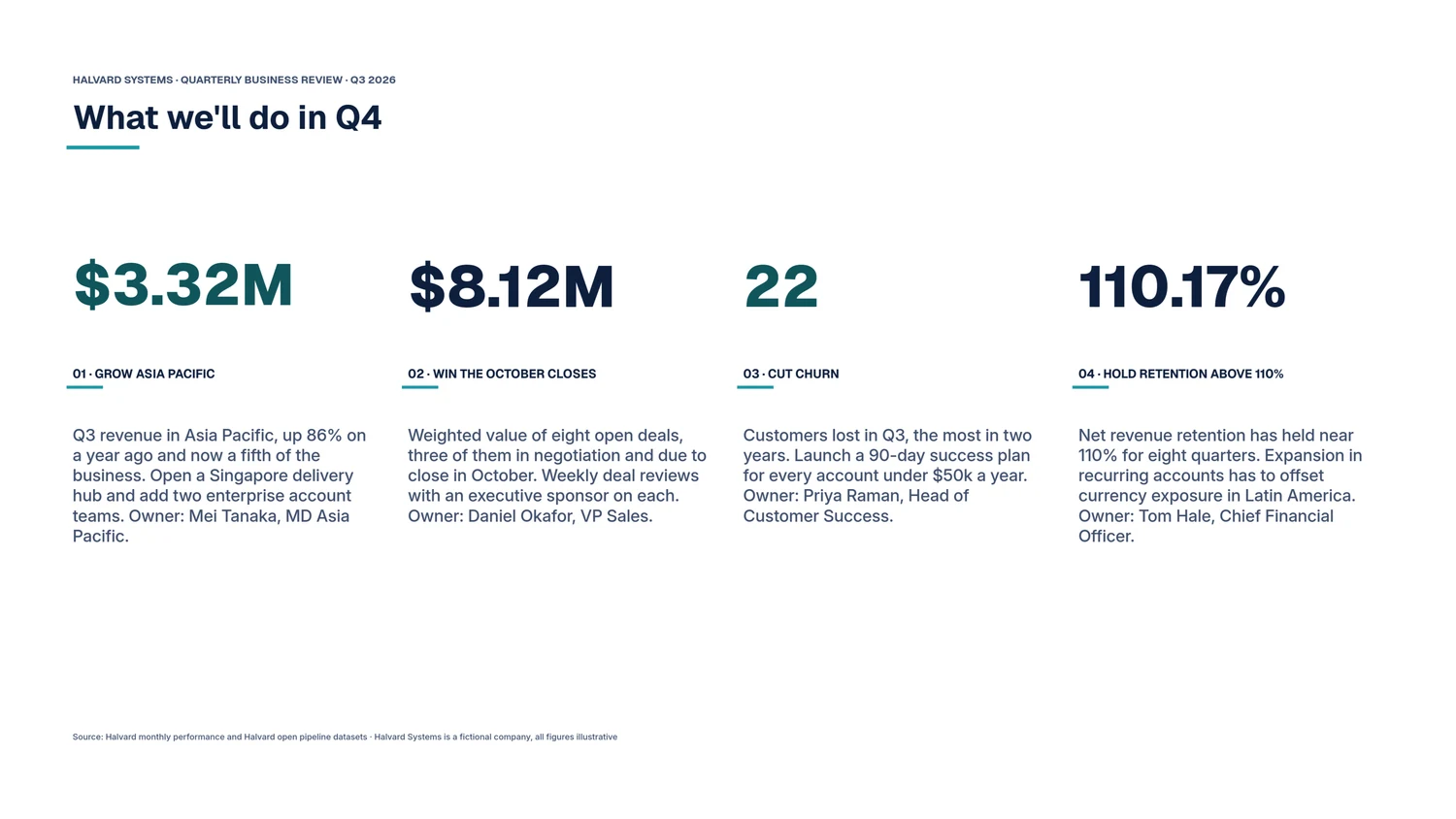
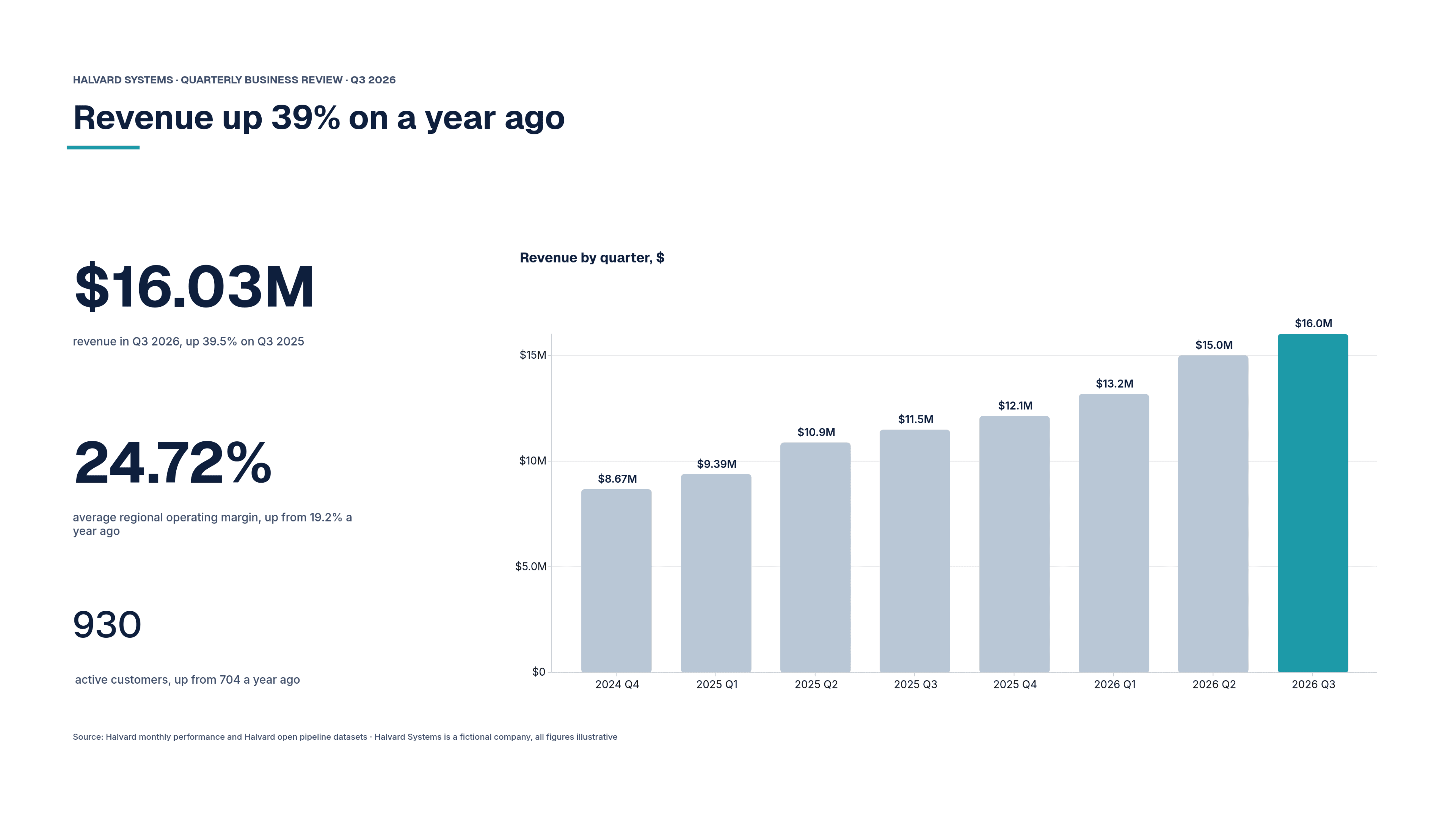
A typeset document bound to live data. This is page 2 of the Halvard review, exactly as Rahoto exported it.
-
A live figure
$16.03M is a Live Value: the quarter’s revenue, summed from the Halvard dataset on every run. Nobody types it in, so nobody types it wrong.
-
Live numbers inside a sentence
“Up from 704 a year ago” is a Live Value too. The words around a figure stay true when the data changes, not just the figure.
-
A bound chart
The bars are drawn from the dataset’s rows, not pasted in. When next quarter’s rows arrive, the next run draws them.
-
A page that runs itself
On its schedule, weekdays at 08:00 for example, the page rebuilds from the latest data and goes to the people and channels you chose. Nobody opens a file.
Delivery
It runs on its own schedule
Set the cadence once. Rahoto refreshes the data, rebuilds the pages and delivers them where your readers already work, and retries a run or a delivery that fails.
Where it arrives
- Slack
- thread or channel
- Teams
- channel post
- inline or attached
- Web
- viewer or embed
- Webhook
- your endpoint
- S3
- bucket drop
- Drive
- shared folder
- SFTP
- host-key pinned
Web publishing is on every plan; the other seven channels come with Pro. PDF, PowerPoint and PNG travel on any of them.
Before it goes out
Before an issue goes out, Rahoto checks the pages, notices when a source changed shape, and waits for you if the numbers moved enough to matter.
After it lands, it answers
Readers can ask the published report questions and get answers computed from the data published with it. It works on reports whose charts are ready for questions.
Building a recurring pack for leadership? Read how Rahoto handles automated board reporting from live data.
It reads from 73 sources: warehouses, databases, SaaS tools, files and documents. Browse the catalogue Missing a source? Tell us which one
Trust
Your rules travel with your data
Who may see which rows and columns is set once by your data owners and holds in analysis, in the editor, in reader questions and in every delivered issue. A report goes out with its publisher’s access, never more.
Rahoto’s AI starts from your dataset, your report and your brand kit, not a blank chat box. AI providers see the shape of your data (columns, types, summary figures), not your rows, and names and identifiers are swapped for stand-ins before a request leaves, and swapped back when the answer returns. Each control below names the plan that includes it.
- Read-only connections
- Every plan
- Connectors read from your sources and are read-only by default.
- SAML SSO and SCIM
- Enterprise
- Sign-in and user provisioning from your own identity provider.
- Customer-managed keys
- Enterprise
- Credentials and sensitive columns encrypted under your key in AWS, Azure, Google Cloud or HashiCorp Vault.
- Tamper-evident audit log
- Scale and Enterprise
- An exportable record of every action; on Enterprise it is append-only and hash-chained.
Measured, and how we know
- 200K points
- explored on the GPU at about 8 ms a frame, with up to about 1,000 marks editable one by one.
- How we know: Median frame time panning a 200,000-point scatter in headed Chromium on hardware WebGL2, from the chart engine’s end-to-end render test.
- Hosted in Helsinki
- Hetzner runs the application servers and the database there.
- How we know: The sub-processor list. Files, exports and backups are stored by Cloudflare R2, in the region its contract sets. Sub-processors
Pricing
Priced per workspace, not per seat
Reader access is free and unlimited on every plan.
-
Free
$0 forever
For individuals composing their first runnable reports.
-
Pro
$69 per workspace / mo · or $690/yr
For teams that publish on a schedule and want variants and AI.
-
Enterprise
Custom annual
For organisations under security review and at reporting scale.
Questions
Questions people ask
What a team asks before it moves a recurring report onto Rahoto.
Does my data leave my warehouse?
Only what a report needs. Rahoto reads a connected source on demand or on the schedule you set, either querying it live or refreshing a snapshot. To run and reproduce reports it stores report documents, bounded data snapshots and generated files, following your retention settings, on servers in the EU. Connections are read-only by default, AI providers see profiles of your data, never raw rows, with common identifiers pseudonymised, and Enterprise adds customer-managed encryption keys.
What does it cost?
Rahoto is free for one person and one report. Paid plans are priced per workspace, not per seat, so adding editors does not change the price, and reader access is free and unlimited on every plan. Enterprise is an annual contract.
Can I use ChatGPT for this instead?
A chat window is a good place to think, and the wrong place to keep a report. It only knows what you paste, it cannot see who is allowed to read what, and next month you start again. Rahoto works from your governed dataset, applies your readers’ data rules, checks the text against the data before an issue goes out, and runs again on the schedule you set. See why a chat window can’t keep your report.
How is it different from Power BI or Looker?
Power BI and Looker are where analysis happens. Rahoto publishes on top of the warehouse and semantic layer a team already trusts rather than replacing them: it composes the recurring report as a designed document and delivers it on schedule. See how Rahoto compares to dashboards, BI tools, and slide decks.
Is Rahoto a dashboard?
No. A dashboard stays on a screen and waits to be opened. A Rahoto report is a paginated document that refreshes from live data and is delivered to the people who read it.
Start with the report you send most often.